How to Flip an Image Online (Mirror Your Selfies Instantly)
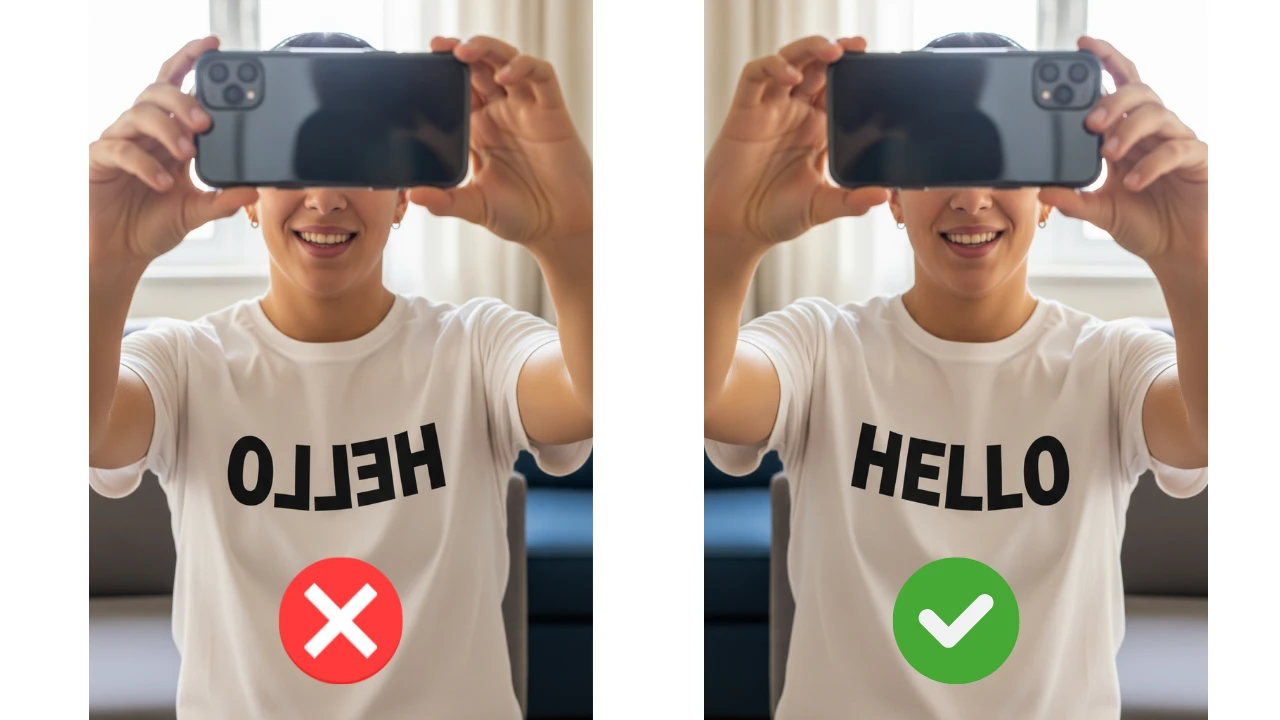
Summary: Took a great selfie but the logo on your shirt is backwards? Don't delete it! Use our free online tool to "Mirror" or "Flip" the image horizontally to make text readable again.
We have all experienced it. You take a perfect selfie, but when you look at it later, everything is reversed. The text on your T-shirt is unreadable, street signs are backwards, and even your hair part is on the wrong side.
This happens because front-facing cameras act like a mirror to help you frame the shot, but some phones save the image exactly as you saw it in the mirror, instead of flipping it to "reality."
Horizontal vs. Vertical Flip
Before you edit, know the difference:
- Horizontal Flip (Mirror): Flips the image left-to-right. This fixes backwards text in selfies.
- Vertical Flip: Flips the image upside down. This is useful for creating artistic "reflection" effects, like a mountain reflecting in a lake.
✅ How to Fix a Backwards Selfie in 3 Seconds
You don't need Instagram or Photoshop to fix this. Do it right here:
- Upload your photo to EasyImageCR.in.
- Locate the "⟷ Flip H" button (Horizontal Flip) in the edit toolbar.
- Click it once. Your image will instantly mirror.
- Check the text in your photo—if you can read it, it's fixed!
- Click "Resize & Download" to save the new version.
Why Not Just Rotate?
Rotating is different from Flipping.
- Rotating (90°): Turns the image sideways. If you rotate a backwards selfie 180 degrees, it will just be upside down *and* backwards.
- Flipping: Actually reverses the pixel order, correcting the mirror effect.
Our tool lets you do both. Use the "🔄 Rotate" button to fix sideways photos, and the "Flip" buttons to fix mirror issues.
⬅ Back to Blogs